Depth of Markets MT5: Complete Guide to Trading with Real-Time Order Flow Data
The Depth of Markets (DOM) feature in MetaTrader 5 provides traders with real-time visibility into pending buy and sell orders at various price levels, offering crucial insights beyond traditional candlestick charts. This transparency into market microstructure enables more precise trading decisions and better execution timing.
If you're looking to master DOM trading on MT5, understand order flow dynamics, and improve your market timing, this comprehensive guide covers everything you need to know. We'll explore what DOM is, how to access it in MT5, and advanced strategies for reading order book data effectively.
What is Depth of Markets (DOM)?
Depth of Market (DOM) is a real-time display of pending limit orders sitting above and below the current market price for any given financial instrument. Think of it as an X-ray into the order book: instead of only seeing the best bid price and best ask price, you see the exact volume of buy and sell orders stacked at multiple price levels, revealing where market participants are positioning themselves.
This market feature goes far beyond what traditional price charts can offer. While a candlestick chart tells you what already happened through chart patterns, the DOM reveals live supply and demand dynamics within the market's microstructure. It shows you where institutional order flow is concentrated, where liquidity pools exist, and where the market might struggle to move through heavy resistance levels or find potential support.
Depth of Market reveals pending orders at various price levels, and DOM reveals market liquidity and supply-demand dynamics in ways that historical data simply cannot. A deep market absorbs large trades without significant price changes, and the DOM is where you can verify that depth before committing capital. Importantly, DOM is dynamic, changing with new orders and cancellations, which means it reflects the current intent of the market rather than its past behavior.
Visual DOM allows rapid identification of market anomalies that would otherwise go unnoticed. Visual representations reduce cognitive effort for traders, making it possible to process complex order book information at a glance. Traders can quickly spot trends using visual DOM tools, and visual DOM enhances decision-making speed in trading by providing a comprehensive overview of market conditions.
For a particular asset traded on an exchange, the DOM reflects real participant orders. For non-exchange instruments like Forex CFDs, the data may be aggregated from multiple liquidity providers or represent broker quotes, which changes how you should interpret the information.
DOM vs. Traditional Candlestick Analysis
The fundamental difference between DOM and candlestick analysis comes down to timing: DOM shows live pending orders while candlesticks show historical prices. Candlestick charts aggregate past trades; DOM reveals current market intent. This distinction matters because by the time a candlestick has formed, the opportunity it represents may already be gone.
DOM helps identify real support and resistance levels based on order flow rather than through lagging technical indicators that rely on historical price data. When you see a wall of buy limit orders stacked at a certain price, you're looking at actual capital committed to defending that level-not a line drawn on a chart based on where price bounced weeks ago. DOM displays actual liquidity, unlike candlestick charts, which are static snapshots of completed transactions.
Traders can react instantly to market changes using DOM's real-time data, giving them an anticipatory edge. For example, if large sell orders suddenly appear above the current price, a DOM trader can adjust positioning before the price movement materializes on the candlestick chart. The DOM can also indicate areas of potential market volatility due to low liquidity, where thin order books suggest price could move rapidly through several levels.
That said, the most effective approach combines both methods. DOM excels at precise entry and exit timing, while price charts and technical indicators provide the broader structural context. Understanding when market depth data is most valuable versus when chart patterns take precedence is a skill that develops with practice.
Why Use the Depth of Markets in MT5?
The biggest advantage of DOM is that it shows more than the current bid and ask. You can see multiple price levels and, when the broker or exchange feed supplies size data, the volume available at each level. That makes it easier to spot liquidity clusters, thin areas, and sudden changes in buying or selling interest before they are obvious on a candlestick chart.
This is especially valuable for fast trading. Scalpers and short-term traders can use the DOM to time entries and exits, place pending orders at specific levels, and react quickly as liquidity changes. In MT5, One-Click Trading also lets you send orders and manage stop levels directly from the DOM, reducing the number of steps between seeing an opportunity and acting on it.
For exchange-traded instruments such as stocks and futures, DOM can sometimes display real exchange order-book prices and volumes, but this is subject to the data depth your broker provides. Forex and most CFDs have no single centralized order book, so any MT5 price and volume levels come from the broker's quotes or aggregated liquidity-provider feed rather than every order in the global market.
For OTC forex, useful DOM is commonly paired with ECN/STP-style or raw-pricing accounts that expose liquidity from multiple providers. Switch Markets, for example, offers an MT5 Pro account with raw spreads from 0.0 pips, a pricing structure that suits fast, short-term trading.
Getting Started with DOM Trading in MT5
Mastering the depth of the market window requires a systematic approach. Follow these steps to build your DOM trading skills from the ground up, starting with the basics of accessing and reading the interface, then progressing to trade execution.
Accessing the DOM Window in MetaTrader 5
To access the DOM on MT5, users can right-click an asset in the market window and select "Depth of Market" from the context menu, or use the Alt + B keyboard shortcut for quick access. Both methods open the dedicated DOM window for the selected financial instrument.
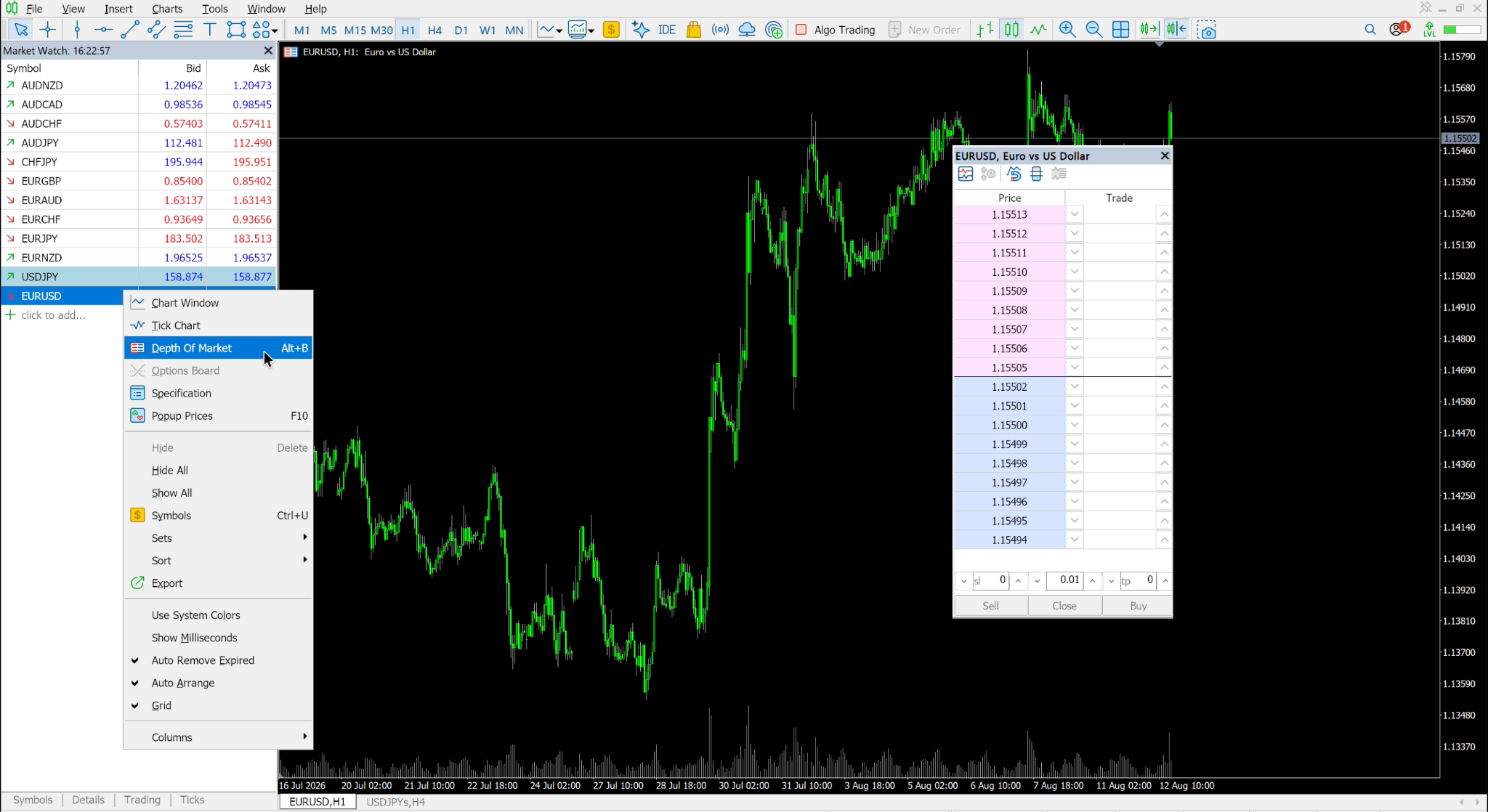
Once open, you can customize the display preferences and layout options to suit your trading style. The market depth window supports different view modes, including an advanced mode that shows every price step-even levels where no pending orders currently exist-which helps you visualize the spread and identify gaps in liquidity.
Before you start trading with DOM, verify that your data feeds are connected and updating in real time. A stale or delayed DOM is worse than no DOM at all, as it can lead to decisions based on outdated information. Check that order volumes are changing dynamically and that the Time & Sales tape is populating with recent transactions.
Understanding the DOM Interface Components
The DOM interface is built around two primary columns: bids on one side and asks on the other. Buy limit orders stack below the current price, while sell limit orders sit above it. Color coding distinguishes the two sides, and horizontal bars or numerical displays indicate the exact volume at each price level, making it easy to spot where liquidity is concentrated.
DOM displays real-time pending buy and sell orders across multiple price levels. The upper part of the DOM shows ask prices where sellers are waiting, while the lower portion reveals where buyers have placed their orders at different prices. Between them sits the spread-the gap between the best bid price and the best ask price.
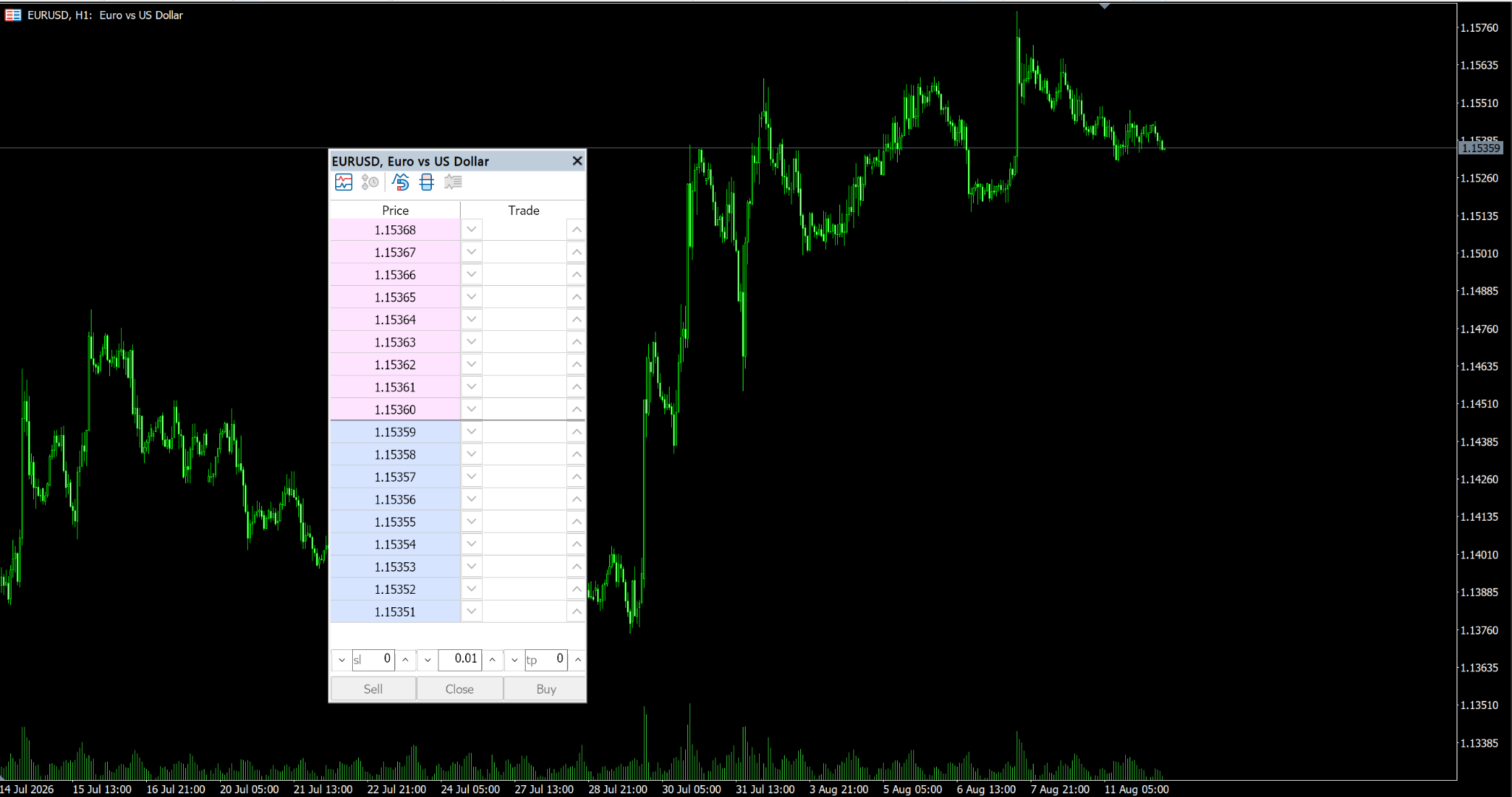
The Time & Sales component shows every executed trade with its price, volume, and trade direction-whether it was a buyer-initiated or seller-initiated transaction. This executed flow data complements the resting order data in the DOM, letting you compare passive liquidity against aggressive orders hitting the book.
The tick chart, often displayed alongside the DOM, shows deals as circles sized by volume with a histogram of traded volume beneath. You can filter by minimum volume to focus on significant transactions and reduce noise during volatile periods.
Executing Trades Directly from DOM
Traders can execute market orders directly from the DOM, and One-Click Trading allows instant execution of market orders without confirmation dialogs. This is essential for scalpers who need to enter positions the moment they see favorable order flow conditions.
Placing pending orders is equally straightforward. Clicking on price levels in the DOM places the appropriate order type automatically: a buy limit below the current price, a sell limit above it, a buy stop above the market price, or a sell stop below it. Visit this guide to learn more about the most popular and widely used order types in trading.
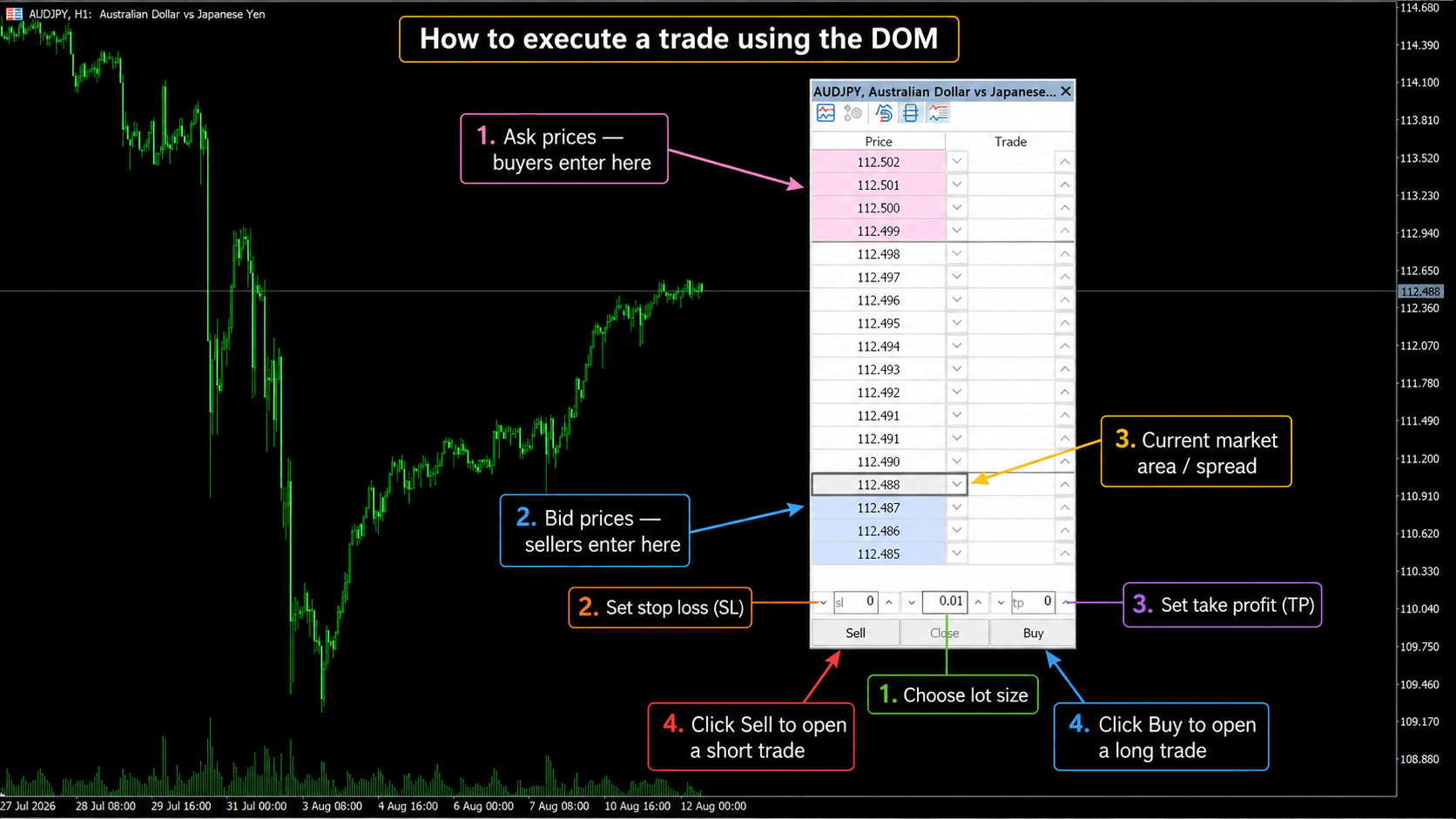
Traders can modify stop levels directly in the DOM interface using drag-and-drop functionality. This means you can adjust your stop loss, take profit, or even move pending orders to new price levels without opening separate order modification windows. Managing open positions becomes faster and more intuitive when everything happens within the DOM ladder.
Best practices include setting your default lot size before entering the DOM, using keyboard shortcuts for rapid order placement, and always confirming that your stop loss levels are in place before engaging in fast-moving markets.
Optimizing Your Trading Infrastructure
DOM trading demands stable, low-latency trading infrastructure. A missed update or delay of even fractions of a second could mean acting on stale book data, leading to entries based on liquidity that no longer exists. Your internet connection must be reliable and fast, particularly during peak market activity.
VPS hosting eliminates many infrastructure risks by providing an uninterrupted connection between your MT5 platform and your broker's servers. A VPS located near your broker's data center can reduce latency and keep your DOM feed running when your home connection or computer fails. If you want that resilience without adding a separate VPS bill, Switch Markets currently partners with ForexVPS to provide eligible Standard or Pro live-account clients with a free trading VPS when they maintain at least $50 in live-account equity. For MT5 users, that makes the Switch Markets-ForexVPS setup a practical option to consider when uptime and latency matter.
When choosing brokers, prioritize those offering quality DOM data with genuine market depth from aggregated liquidity providers. Test the number of price levels shown, whether order volumes change dynamically with incoming trades, and how many levels of depth are available for the instruments you trade.
Set up backup systems including redundant internet connections and alternative execution methods. If your primary DOM feed becomes unreliable during a critical trading session, having a fallback prevents costly mistakes. Regular testing of DOM functionality against your broker's data ensures you catch any degradation before it impacts your trading.
Key Factors When Choosing Your DOM Trading Setup
The quality of your DOM trading experience depends heavily on three factors: your broker, your infrastructure, and your platform configuration. Getting any one of these wrong can undermine even the most skilled order flow analysis.
Broker Selection for Quality DOM Data
Choose ECN or STP brokers that provide aggregated market depth from multiple liquidity providers. These account types are more likely to offer useful depth than brokers that expose only synthetic or limited DOM data. If you're comparing options, Switch Markets is worth testing alongside other candidates because it supports MT5 and offers a Pro account with ECN-style pricing, while its free VPS arrangement can also simplify the infrastructure side of your setup. Still, do not choose any broker on marketing claims alone: verify the actual DOM levels, how volumes update, and your real execution quality on the instruments you trade.
Evaluate data quality by monitoring how many price levels your broker exposes and whether order volumes update dynamically during active trading hours. Some brokers show as few as one level of depth for certain instruments, which provides almost no useful information. Others expose 10 to 20 levels with real-time volume changes-a meaningful difference for anyone serious about DOM trading.
The account type directly affects DOM visibility and accuracy. Exchange-mode instruments generally provide the most authentic DOM data reflecting real market requests from participants. For Forex and CFD instruments, the depth represents broker-aggregated quotes rather than a centralized order book.
Assess broker execution speed and slippage for DOM-based strategies by testing on a demo account first. Place market orders during different levels of market activity and compare your fill price against the best price displayed in the DOM at the moment of execution. Consistent slippage suggests infrastructure issues that will erode your edge.
Technical Infrastructure Requirements
Internet speed and stability requirements for real-time DOM data are more demanding than standard chart-based trading. DOM updates arrive asynchronously and frequently-potentially dozens of updates per second during active markets. Any interruption in your connection creates blind spots in your order flow picture.
VPS hosting near your broker's data center provides the lowest practical latency for DOM data and order execution. This co-location advantage helps the market depth window on your screen reflect conditions as close to real time as possible. For traders choosing a standalone provider, Switch Markets VPS is built specifically around trading workloads and offers server locations across major financial hubs, making it a sensible service to compare on latency, uptime, resources, and support. If you trade through Switch Markets and remain eligible for its sponsored plan, you can access ForexVPS without a separate VPS charge.
Running multiple DOM windows simultaneously alongside Time & Sales, tick chart displays, and footprint tools requires significant computing resources. Ensure your setup has adequate CPU power, RAM, and a stable network connection to handle the data throughput without lag or freezing.
Backup systems and redundancy planning for critical trading sessions prevent catastrophic failures. This includes uninterruptible power supplies, secondary internet connections, and predefined procedures for what to do if your primary trading infrastructure goes down while you have open positions.
Platform Features and Customization
DOM capabilities vary across different MT5 broker implementations. Some brokers enable advanced DOM features like integrated Time & Sales data, while others provide only basic price level displays. Compare offerings before committing to a broker for DOM-focused trading.
Customization options for DOM display and alert systems let you tailor the interface to your specific trading style. Advanced mode in MT5's DOM can show every price step even if no orders are present, toggle visibility of bid and ask charts, display trades on the tick chart, and filter by minimum volume to focus on significant market activity.
API access for automated strategies incorporating DOM data is available through MQL5's event-based subscription system. Expert Advisors can subscribe to book events and receive real-time updates to the order book, enabling programmatic analysis of market depth data alongside standard price and indicator inputs. This opens the door to sophisticated automated strategies that factor in order book conditions when making trading decisions.
Wrapping Up
Depth of Markets in MT5 gives traders a window into real-time market behavior that goes far beyond what traditional price charts can reveal. By showing where pending limit orders are clustered, where liquidity is thick or thin, and how aggressive orders interact with resting volume, DOM transforms your understanding of price movement from reactive to anticipatory.
Reading order flow effectively requires practice, patience, and a willingness to start with demo accounts before risking capital. Pattern recognition develops over time-absorption, imbalances, spoofing, and institutional positioning all become more visible as you accumulate screen time with the DOM.
None of this matters, however, without sound risk management and proper infrastructure. DOM data shows possibilities, not certainties. Combining DOM insights with disciplined stop loss placement, appropriate position sizing, and confirmation from multiple data sources creates a robust framework for making informed decisions.
Start with demo practice, focus on understanding the core components of the DOM interface, and gradually build your skills in reading order flow before transitioning to live trading. As your confidence grows, optimize your setup with quality broker connections and reliable VPS hosting that keeps your DOM feed running consistently-because in order flow trading, the moment you lose your data connection is the moment you lose your edge.
FAQs
Still have questions about using Depth of Market in MT5? Here are quick answers to some of the most common ones.
What's the difference between DOM in MT4 and MT5?
MT5 provides full DOM functionality with volume data at multiple price levels, Time & Sales integration, tick chart displays, and one-click trading directly from the depth of the market window. MT4, by contrast, has no built-in DOM window and at best offers limited broker quotes without real volume information. MT5 supports more order types, including buy stop limit, sell stop limit, and better programmatic access to order book data through MQL5 events.
Do I need a VPS for DOM trading?
VPS hosting helps keep your DOM data feed and trading platform online when your local internet, power, or computer goes down. It is not a must-have for every trader, but it becomes much more useful for scalpers, algorithmic traders, and anyone relying on real-time order flow.
How accurate is DOM data in forex markets?
DOM accuracy depends entirely on broker type and liquidity provider connections. ECN and STP accounts typically provide more accurate aggregated market depth drawn from multiple liquidity providers, while market maker accounts may show synthetic or limited data. Forex DOM displays indicative liquidity rather than a centralized exchange order book, meaning the volumes represent aggregated broker quotes rather than a single, unified marketplace.
Risk Disclosure: The information provided in this article is not intended to give financial advice, recommend investments, guarantee profits, or shield you from losses. Our content is only for informational purposes and to help you understand the risks and complexity of these markets by providing objective analysis. Before trading, carefully consider your experience, financial goals, and risk tolerance. Trading involves significant potential for financial loss and isn't suitable for everyone.