How to Build High-Performing Trading Strategies Using AI Tools
You've probably heard that “AI is coming for your jobs!” Right? But since trading is not a job per se, how does AI impact this field? Let's find out.
You see, while the whole world is going crazy about this new technology, for retail traders, this shift presents a massive opportunity. You no longer need a PhD in mathematics to compete; you just need to know how to build high-performing trading strategies using AI tools.
So, in this guide, we will walk you through the fundamentals of AI trading strategies. We will also explore the technology behind them and show you exactly how to use them to build and backtest your own strategy.
What is Artificial Intelligence (AI) in Trading?
Except you've been living under a rock, you'd have heard every Tom, Dick, and Harry talk about Artificial Intelligence and its potential.
Also, we are not ignorant of the fact that a lot of misinformation is being passed around regarding this novel innovation. So, let's quickly explain what AI in trading is.
When you think about AI, what comes to mind? Killer robots or machines taking over the world? Well, those are fiction. In the real world, AI is much more practical.
Traditionally, computer programs were rigid; they only did exactly what a human coded them to do. If "A" happens, do "B." But AI is different because it learns.
It can ingest massive amounts of data, recognize patterns that would be invisible to the human eye, and improve its performance over time without needing to be constantly reprogrammed.
What about trading? AI in trading refers to the use of artificial intelligence technologies. This includes machine learning, algorithms, and data analysis models in order to analyze market data, identify patterns, and support trading decisions. Essentially, AI systems can process large volumes of price data, news, and indicators much faster than humans, helping traders spot opportunities, test strategies, automate executions, and manage risk more efficiently.
In other words, it allows you to build a robot that trades for you. But someone needs to build the robot, right? Well, that's your job.
How AI Applies to Trading Strategies
Okay, so we know AI is smart. But how does that translate to better entries, tighter exits, and more profit in your trading?
For us retail traders looking to apply AI to our trading, the approach generally falls into two massive buckets: Shortcutting the Analysis and Automating the Execution.
Here is how these two concepts are changing the game for retail traders:
1. Shortcutting the Analysis
Let's be honest, learning Technical Analysis is a grind. You have to memorize candlestick patterns, understand Fibonacci retracements, and master support and resistance zones. It then takes years to get "the eye" for it.
AI completely flattens this learning curve.
For instance, recently, traders have taken a screenshot of their chart and uploaded it to AI tools like ChatGPT or Gemini. Instead of remembering and applying different trading concepts they've learned, they can just tell the AI:
"Conduct a thorough technical analysis of this chart. Based on the market structure, suggest a high-probability Entry, Stop Loss, and Take Profit."
And that's it. The AI Tool of use will spew out clean and clear analysis.
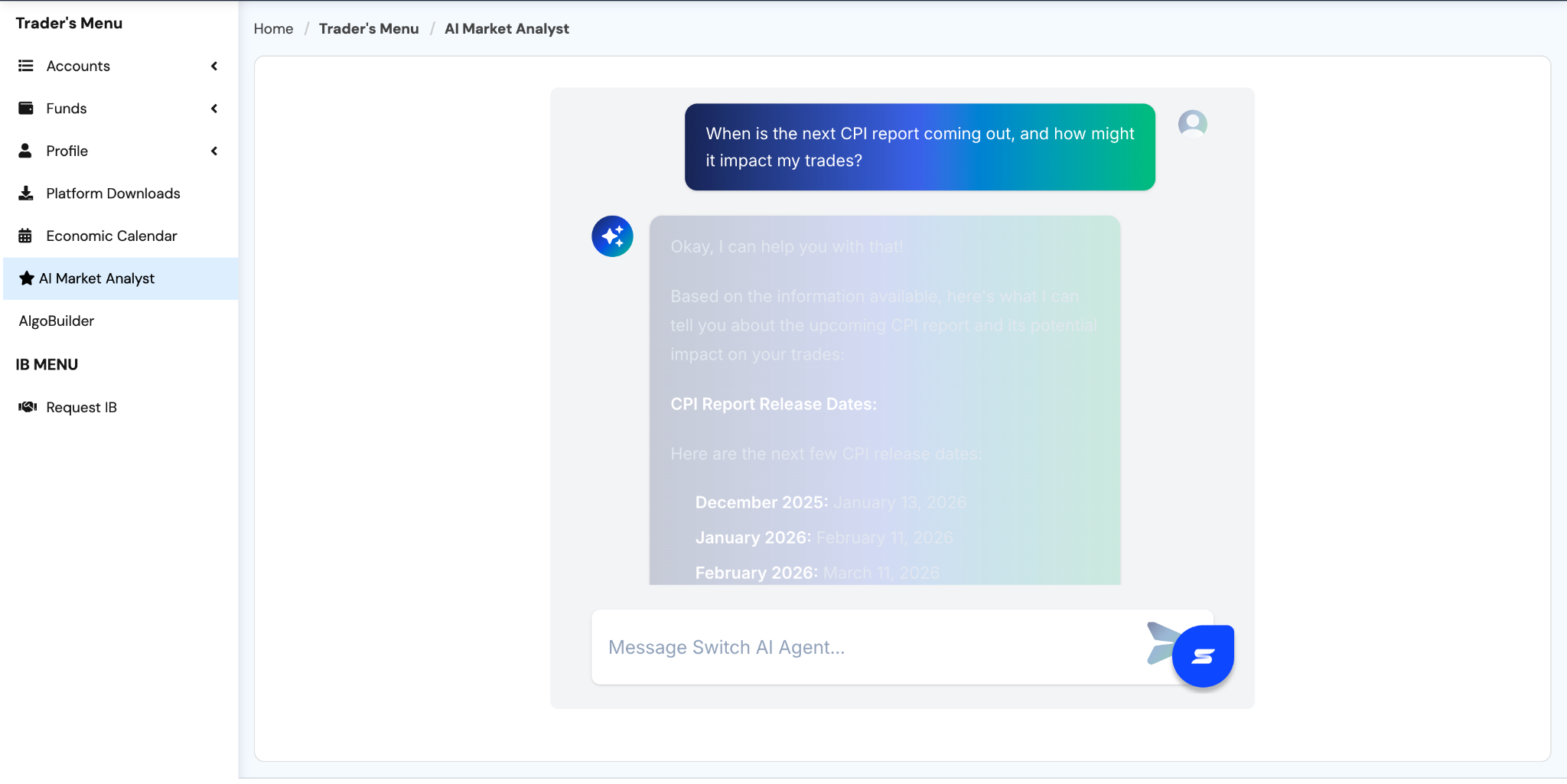
You can even take it a step further by asking our Proprietary AI Market Analyst inside the Switch Markets cabinet to perform a Fundamental Analysis of the asset at the same time. It will scour the web for economic news and sentiment, combining it with the technicals on your chart to give you a clear, data-backed result in seconds.
Here’s what it looks like:
What about technical analysis? Let's put this whole thing to the test so you know how to do it on your own.
So, let's say you want to trade Gold, just take a clean screenshot of your chart. Make sure you show enough historical price action for context.
After that, go to Gemini or ChatGPT, upload your chart, and type in the prompt. In this example, we will use ChatGPT. Everything should look like this:
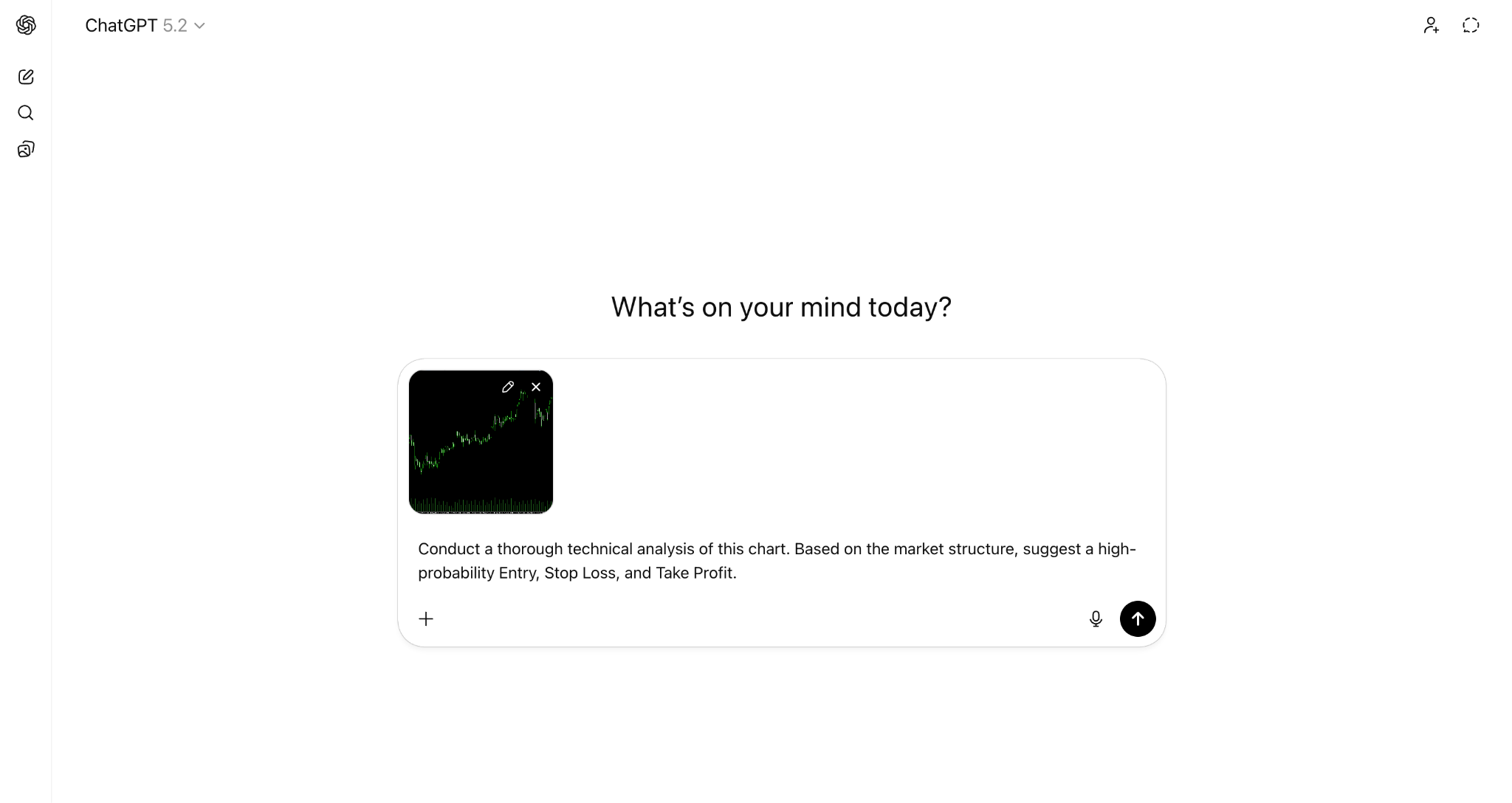
If you've gotten somewhere similar to what's shown above, go ahead and hit the arrow button.
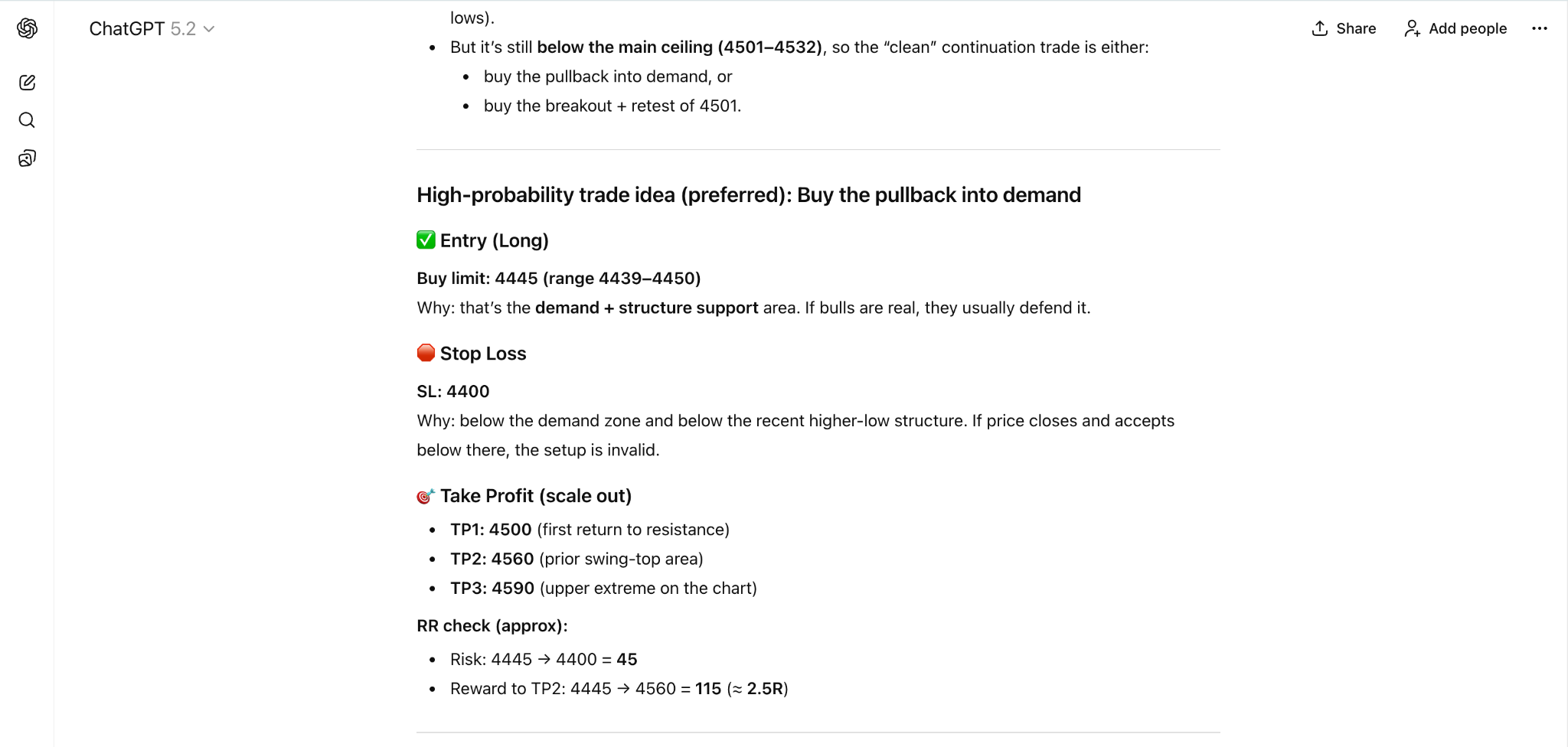
There it is, your perfectly analysed chart. However, it’s important to note that this is for educational purposes only and should not be taken as financial advice in any way.
2. Automating the Execution
This second application is for the traders who already have a system that works but are tired of being glued to their screens 12 hours a day.
In the past, if you wanted to turn your manual strategy into an automated trading robot (Expert Advisor or EA), you had two painful options:
- Become a master programmer (learning C++, MQL4, or MQL5).
- Hire a developer, pay them hundreds of dollars, and wait weeks for them to deliver code that might still have bugs.
AI has deleted this barrier.
Now, you can use AI-powered tools like AlgoBuilder to automate your trading in minutes, not weeks. You simply describe your strategy logic in plain English, and the AI handles the heavy lifting of generating the code. It empowers you to build, test, and deploy your own custom EAs without ever writing a single line of code yourself. To learn more, you can visit our guide on how to build a trading bot without coding on Switch Markets, or you can continue reading this guide.
It is highly recommended to use a VPS for automated trading strategies. Using a VPS is essential for algorithmic trading because it ensures low latency, stable connectivity, and uninterrupted execution of automated strategies 24/7. Here, at Switch Markets, all clients get a VPS for free when opening an account.
How to Build Your Strategy with AlgoBuilder
Most successful trading strategies can be programmed into “if/then” rules (e.g., “buy if the price crosses the 50-day moving average”). If your strategy falls into this category, it's best to automate it.
As we've mentioned earlier, the decision to automate your strategy is quite easy, but the execution is not. You'll have to write hundreds or thousands of lines of code, and that's even if you know how to code.
What if you don't know how to code? Even worse. Simply get ready to spend an arm and a leg on programmers. Then, you just have to wait for a few weeks or months, and hopefully you'll have a beta version of your strategy.
This is where AlgoBuilder comes in. It is designed to bridge the gap between complex AI trading strategies and non-technical traders. You don't have to know how to code, you don't have to pay thousands of dollars to programmers, and you will get your strategy within minutes. AlgoBuilder has also just been rebuilt into a single, chat-driven workspace, so building, testing, and refining a strategy now happens in one continuous conversation rather than a series of separate screens.
Let us walk you through how to build your first high-performing trading strategy using the new AlgoBuilder.
Step 1: Log In and Access the Platform
The first step is to log in to your AlgoBuilder account. You have two options to access this powerful tool:
- Standalone Product: You can pay for AlgoBuilder directly as a standalone product.
- Switch Markets Offer: You can claim the account for free after funding your Switch Markets trading account with at least $50. This is a great way for retail traders to get started with minimal upfront cost.
You can also simply try the software out using a demo account. With that, you can create one strategy and backtest it for weeks or even months at no charge to you at all.
Step 2: Describe Your Strategy in Plain English
Once you're logged in, AlgoBuilder opens straight to a single prompt: "What strategy would you like to build today?" You simply describe your trading idea in plain English, and AlgoBuilder generates, backtests, and optimizes it for you.
The more specific you are, the less AlgoBuilder has to guess. A strong prompt names the market, the date range or timeframe, and your risk parameters up front, for example: “run a trend-following strategy for Gold, July 2025 to February 2026, risk-reward ratio of 1:3, risking 1% per trade.” Give it a strategy name if you'd like to keep track of multiple versions later.
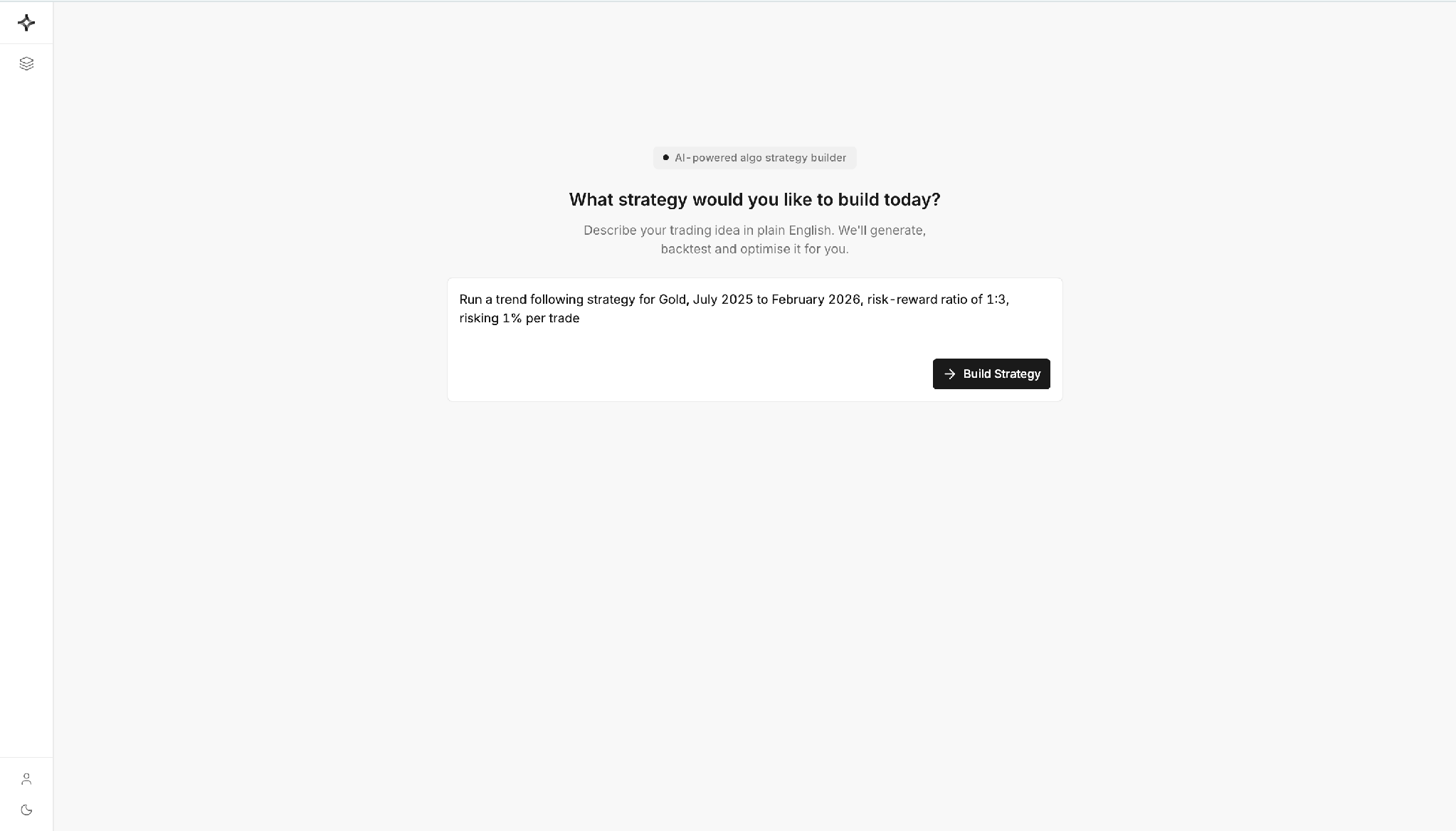
Once you're happy with your description, click "Build Strategy" and let the system take over.
Step 3: Let AlgoBuilder Generate, Explain, and Backtest the Code
After you click "Build Strategy," you land in AlgoBuilder's main workspace: a Visual Backtester on the left and a live Chat panel on the right, with Build and Deploy modes at the top.
The chat panel writes your strategy and then explains it back to you in full: the entry logic, the indicators used, the filters applied to avoid choppy conditions, the stop-loss and take-profit rules, and the position-sizing method. Because it states every assumption in plain language, you can catch and correct anything that doesn't match your intent before a single trade is tested.
From there, AlgoBuilder runs an initial backtest automatically and reports the results in the same conversation: total return, number of trades, win rate, profit factor, and maximum drawdown. It doesn't stop at the headline numbers, either. It digs into what actually drove the result, for instance, noting that long trades carried the strategy while short trades dragged on performance, and uses that insight to suggest a concrete next step.
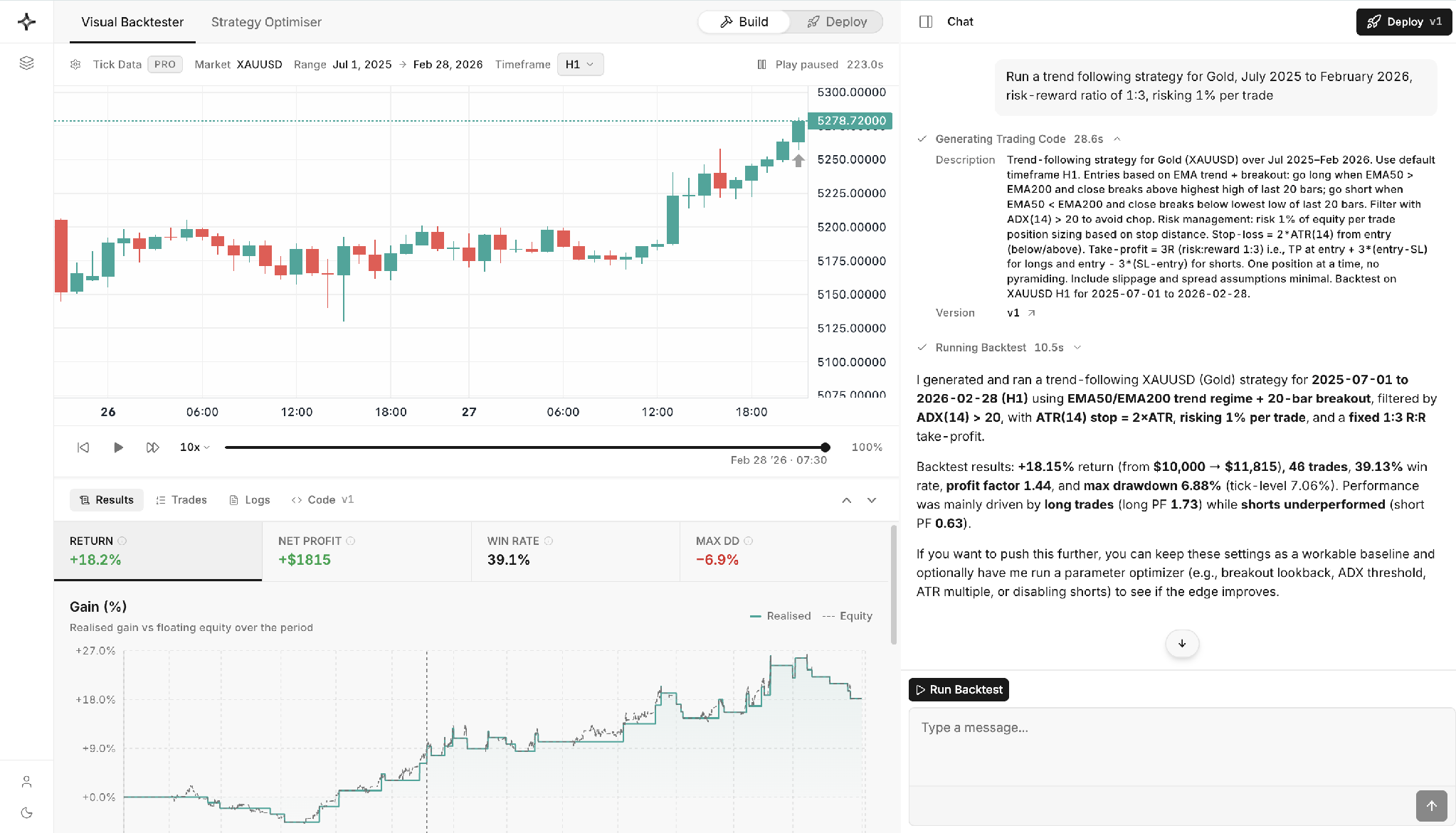
If the strategy already performs well, that's a solid baseline. If it doesn't, or if you simply want to see whether it can be improved, the chat will offer to run a parameter optimizer next.
Step 4: Refine with the Strategy Optimizer
Switch to the Strategy Optimizer tab, choose the metric you care most about (Sharpe ratio is a common default, since it balances return against volatility), and let AlgoBuilder search across a range of parameter combinations on your behalf.
The results come back as a ranked table: return, Sharpe ratio, profit factor, maximum drawdown, win rate, trade count, and ending balance for every combination it tested. The chat then reads the table for you and states, in plain terms, exactly which parameter set produced the best result, down to the specific indicator lengths and risk settings.
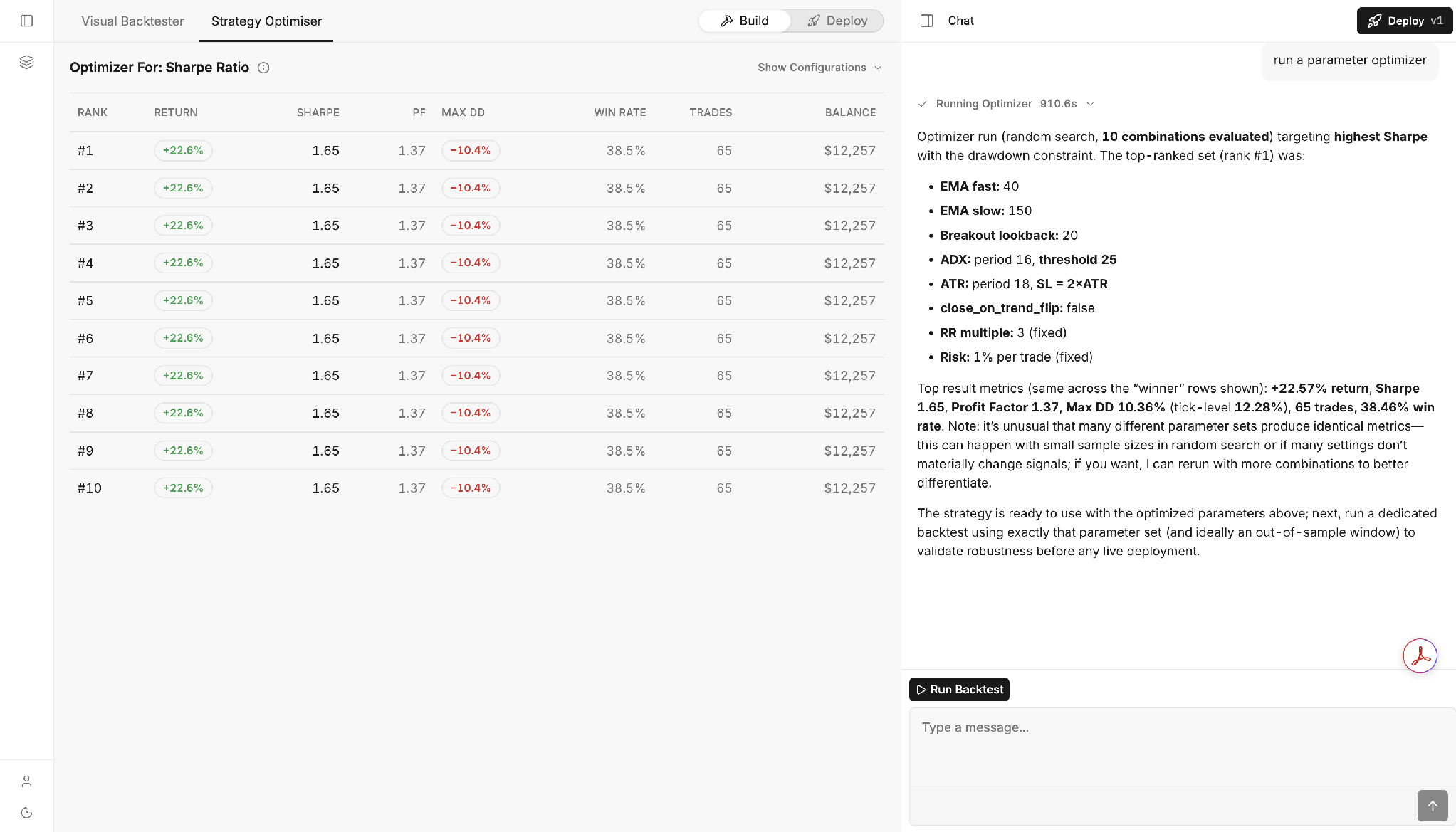
Read the chat's notes carefully here, not just its conclusions. A genuinely useful optimizer will flag its own limitations. In this run, for example, several ranked rows returned identical metrics, and the chat pointed out that this pattern usually means too few combinations were tested, or that some of the parameters being varied weren't actually changing the strategy's trading signals. That's a valuable, honest signal; take it as a prompt to rerun the optimizer with a wider search before trusting the result.
Step 5: Validate, Download, and Deploy
A winning row in the optimizer table is a lead, not a conclusion. Before you trust it, ask the chat to run a dedicated backtest using exactly that parameter set, and, where possible, on an out-of-sample period the optimizer hasn't already seen. This confirms whether the improvement is a genuine edge or an artifact of fitting too closely to one stretch of history.
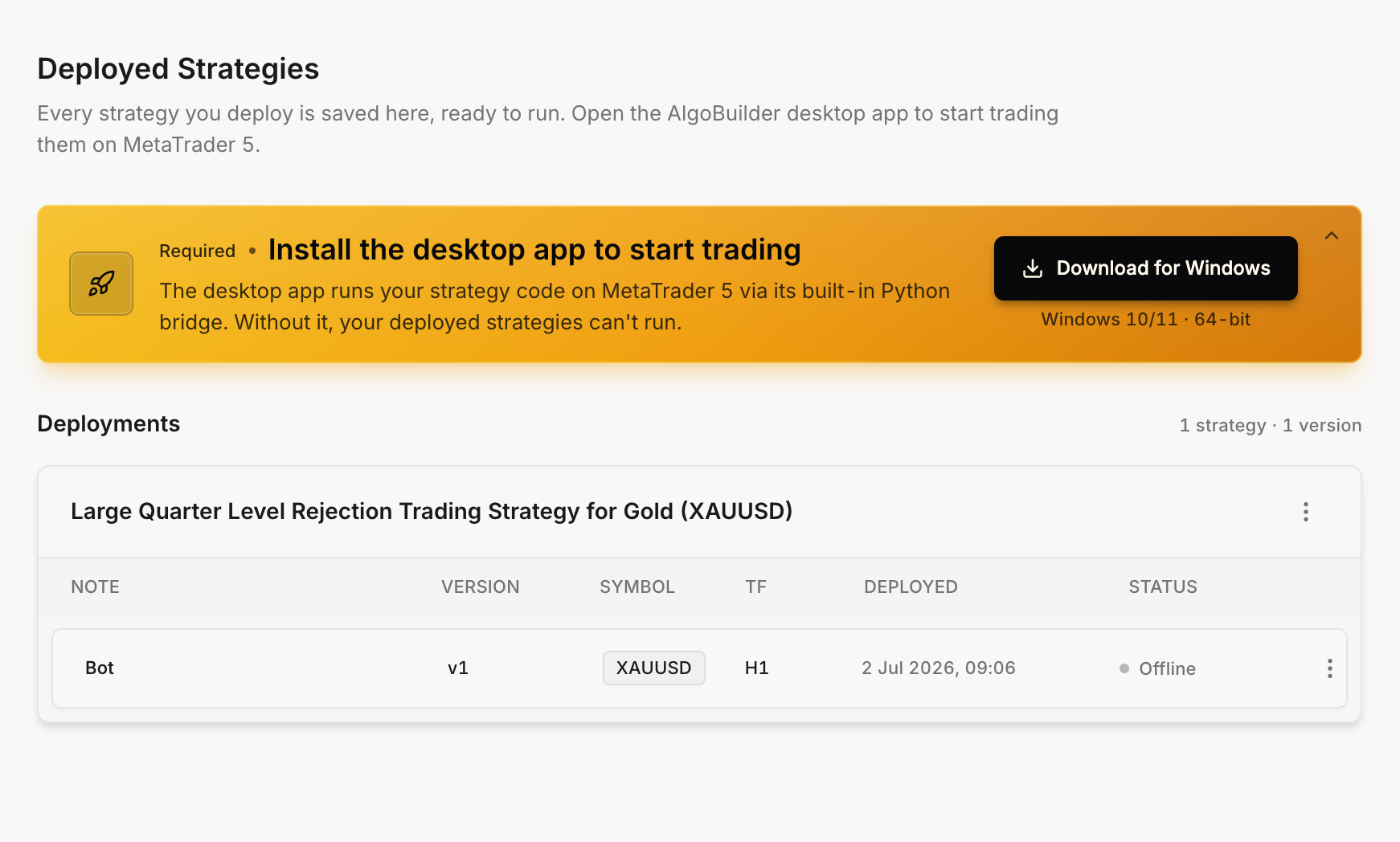
Once a strategy holds up under validation, you can move it from Build to Deploy inside the same workspace. From there, follow the platform's prompts to install the AlgoBuilder desktop app and connect it to MetaTrader 5, so your strategy can trade on your live or demo account.
For the full walkthrough of that final stage, including installing the desktop bridge and monitoring your deployment, see our guide on how to build a trading bot without coding on Switch Markets.
Best Practices for AI-Powered Trading
As you enter the world of AI-powered trading, keep these tips in mind to ensure long-term success:
Wrapping Up
So, is AI here to “replace” traders? Not even close.
What AI is really doing is removing friction. It’s shortening the learning curve. It’s eliminating repetitive work. And most importantly, it’s giving retail traders access to tools that were once reserved for hedge funds and quant desks.
You no longer need to stare at charts all day or wrestle with complicated code just to compete. With AI-powered tools like AlgoBuilder, you can focus on what actually matters: defining a solid trading logic, testing it properly, and executing it with discipline.
But here’s the key thing to remember.
Used correctly, AI turns trading into a process. A repeatable system. A statistics game where decisions are made before the trade, not during it.
And that’s where real consistency comes from.
FAQs
AI in trading, especially for retail traders, is a recent development. So, it’s okay to have some questions. Here are some of the frequently asked questions around this topic and our best answers.
Can AI guarantee profits in trading?
No. There is no tool that can guarantee profits in the financial markets. AI helps you analyze data faster, remove emotional decision-making, and execute strategies more consistently, but risk is always present.
Do I need programming skills to use AlgoBuilder?
Not at all. AlgoBuilder is designed specifically for non-technical traders. You describe your strategy in plain English, and the platform handles all the coding behind the scenes.
Is AI trading suitable for beginners?
Yes. AI can help beginners shortcut analysis and learn faster, but understanding basic trading concepts and risk management is still essential. AI should support your decisions, not replace your judgment.
Can I use AI strategies on a demo account first?
Absolutely. In fact, this is strongly recommended. Backtesting and demo trading allow you to validate your strategy without risking real capital. Bear in mind that Switch Markets offers a non-expiring demo account, which is essential for those who wish to automate their trading strategies and regularly backtest their AI strategies.
Risk Disclosure: The information provided in this article is not intended to give financial advice, recommend investments, guarantee profits, or shield you from losses. Our content is only for informational purposes and to help you understand the risks and complexity of these markets by providing objective analysis. Before trading, carefully consider your experience, financial goals, and risk tolerance. Trading involves significant potential for financial loss and isn't suitable for everyone.